AION 2 Companion
Loot, Kinah, and drop rate tracker powered by passive Npcap packet capture. Zero DLL injection, zero game memory modification, zero macro or input automation.
Desktop app at native size — open the full demo to zoom in.
Six dedicated tools built for empirical farming audits
From live combat tracking to instance history, all data is derived directly from local read-only network traffic.
Combat Loot & Verified Kinah
Records items and Kinah gained strictly from confirmed combat kills. NPC purchases, trade window exchanges, and unverified inventory moves are excluded.
Solo, Shared & Global Drop Rates
Calculates empirical drop rates per mob, distinguishing solo kills from group or alliance kills to prevent sampling bias across loot distributions.
Dungeon & Instance Run History
Segments farming sessions by dungeon runs, measuring total duration, boss encounter drops, earned Kinah, and rare loot yield per attempt.
Market Reference Prices & Overrides
Evaluates gross and net inventory yield using per-server Aion2Market reference data, allowing one-click custom overrides for specific items or gear.
Gathering Mode & World Extraction
Toggle dedicated mode for ore, plant, and aether nodes, tracking gathering yields per hour and material success rates across exploration zones.
Built-In Updater & Transparent Changelog
Checks for application and monster catalog updates on startup. Full changelog history and protocol adjustments visible in the app and website.
Everything you need to audit your farming efficiency
Built for players who want to understand their exact grinding returns without invasive methods.
Desktop app at native size — open the full demo to zoom in.
Passive packet capture versus invasive software
Understand the fundamental architectural difference between AION 2 Companion and intrusive game-hooking utilities.
Passive packet capture versus invasive software. Understand the fundamental architectural difference between AION 2 Companion and intrusive game-hooking utilities.
AION 2 Companion (Passive)
Runs outside the game process as an isolated, read-only local network packet parser.
- Passively inspects local network packets via official, verified Npcap drivers
- Isolated Windows process with zero access to game client modules or memory threads
- In-game HUD renders in a transparent overlay window without DirectX hooks
Invasive Utilities (High Risk)
Conventional cheat tools, bots, and hooking overlays that compromise client process integrity.
- Dynamic library (.dll) injection and interception of internal engine rendering calls
- Read and write access to live process memory addresses and data structures
- Automated mouse clicks, combat rotation macros, and artificial packet injection
Companion operates strictly as a passive network listener: zero memory reading, zero DLL injection, zero input automation, and zero packet transmission to game servers.
AION 2 Companion (Passive)
Runs outside the game process as an isolated, read-only local network packet parser.
- Passively inspects local network packets via official, verified Npcap drivers
- Isolated Windows process with zero access to game client modules or memory threads
- In-game HUD renders in a transparent overlay window without DirectX hooks
Invasive Utilities (High Risk)
Conventional cheat tools, bots, and hooking overlays that compromise client process integrity.
- Dynamic library (.dll) injection and interception of internal engine rendering calls
- Read and write access to live process memory addresses and data structures
- Automated mouse clicks, combat rotation macros, and artificial packet injection
Companion operates strictly as a passive network listener: zero memory reading, zero DLL injection, zero input automation, and zero packet transmission to game servers.
Ready in three simple steps
No account registration, no remote logins, and no heavy dependencies. Get your loot tracker running in under two minutes.
Install Npcap
Download and install official Npcap with WinPcap compatibility mode checked. Npcap provides the standard Windows driver for safe, read-only local packet inspection.
Run the Companion Installer
Open the AION 2 Companion installer (or extract the portable .zip archive). The application detects your active network adapter and starts the background listener.
Start Session & Open HUD
Launch AION 2 in Borderless Windowed mode. Click Start Session or press Alt+A to toggle the floating in-game HUD and monitor drops in real time.
Requires Windows 10 or 11 (64-bit) and Npcap 1.70+ installed. AION 2 must run in 'Borderless Windowed' mode for the in-game overlay HUD to render properly.
Modern desktop interface & transparent HUD
Inspect the desktop analytical dashboard and the HUD rendered directly above your game client. Captures use sample data.
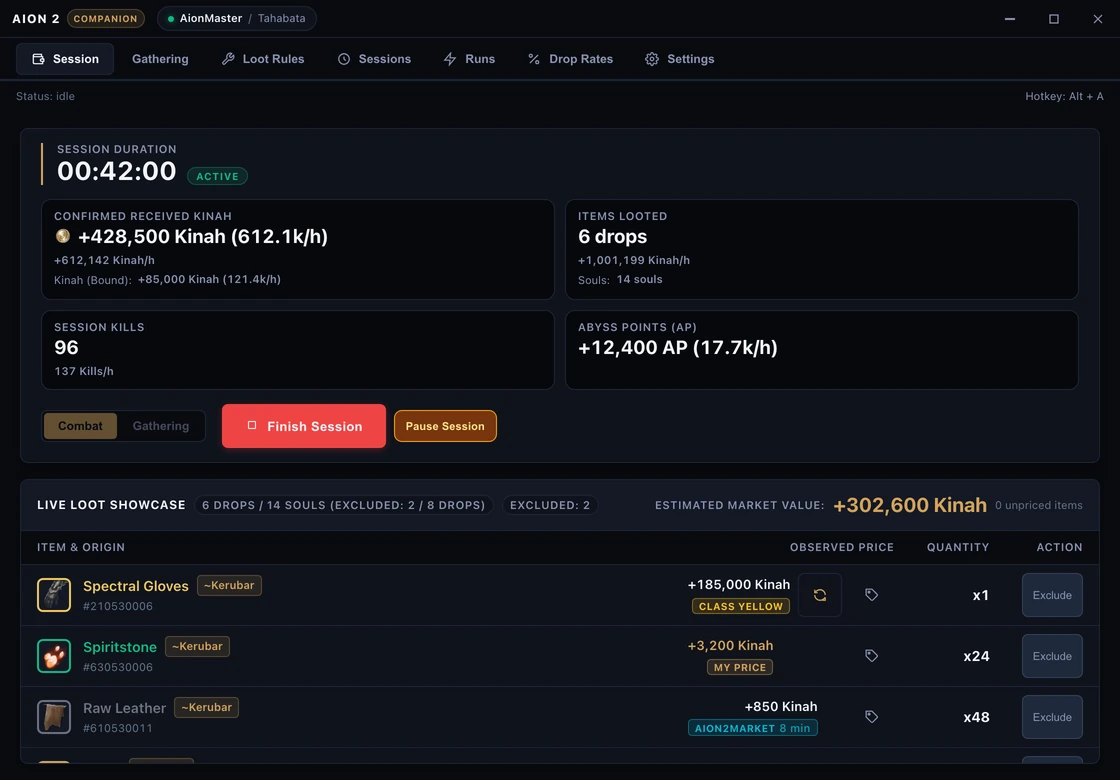
Main Dashboard — Active Session & Loot
Live monitoring of Kinah, combat Abyss Points (AP), dropped items, and estimated market value.
Drop Rate Auditor — Samples & Probability
Empirical drop statistics computed per monster with kill counters and observed item counts.

In-Game HUD — Default Layout
Standard combat overlay view featuring quick controls and a recent drops feed.

In-Game HUD — Resized Layout
The overlay is fully resizable to adapt to any resolution, ultrawide screen, or layout preference.

Release Notes
Track recent changes, improvements, and fixes in Aion 2 Companion.
Drop rates with solo and shared kill views
Added
- Drop rates now show solo and shared-kill rates side by side, and you can switch between Solo, Shared and All.
- Shared kill view lets you inspect drop rates and loot gathered specifically when fighting alongside other players.
Changed
- Drop rate calculations separate solo and shared hunts so group encounters never skew your personal farming rates.
Runs tab, Loot Rules refresh and community drop insights
Added
- Runs & Instances now has its own tab with per-run history, duration, outcome and loot.
- Community drop insights highlight the most searched items with observed drop rates and current market prices.
- Loot Rules refresh with clearer rule rows, helper text and consistent buttons.
Changed
- The Drop Rates page now shows per-monster results only after you pick an item, with region filters and sortable columns.
- Runs and farming sessions are stored independently, so one never replaces the other.
Fixed
- The Runs tab no longer shows an empty list after switching tabs.
- Loot Rules text fields now match the dark theme instead of showing a white background.
Dungeon run history and instance catalog
Added
- Run History section in the Sessions tab with type filters for Dungeon, Shugo and Dimensional runs.
- Detailed per-run summary showing duration, outcome, defeated bosses, deaths, gathered loot, and currencies.
- Dungeon catalog with 48 instances, including Portuguese names and boss lists.
- Custom instance naming allows labeling an unknown instance once and remembering it for future runs.
Changed
- Zone transitions detect current map locations more accurately when entering instanced areas.
- Dungeon entry and completion events are tracked automatically as soon as your run begins.
- Dungeon runs and general farming sessions are stored independently so instanced runs never overwrite session history.
Known limitations
- Shugo Festival arenas require one manual name selection per map.
- Dimensional Invasion events in open world zones currently require manual session tracking.
Common questions about the Companion
Direct, technical answers regarding safety, requirements, and features.
Is there any ban risk when using the Companion?
No third-party tool can honestly claim zero risk, and you should be skeptical of any developer that does. Companion never injects DLLs, never reads or writes game memory, and has no macro or keystroke automation. It listens passively to incoming network packets via Npcap on your local network adapter in read-only mode. From the game client and anti-cheat perspective, the game process is completely untouched.
Why is Npcap a mandatory requirement?
Windows restricts applications from capturing raw network packets without a kernel-level driver. Npcap is the industry-standard packet capture driver (the same used by Wireshark). It enables the Companion to inspect incoming packets on your adapter without requiring invasive administrative hooks.
Does it impact game performance or frame rates?
No. Packet processing runs asynchronously on a separate thread with low overhead. Actual resource consumption depends on your machine. The in-game HUD utilizes lightweight hardware-accelerated rendering with an energy-efficient redraw rate.
Where do item reference prices come from?
Reference valuations are synced periodically from community-aggregated market data on aion2.exchange. If prices differ on your specific server or for unique gear, you can override any item's unit value directly in the interface with one click.
Does the overlay work in exclusive fullscreen mode?
Because the Companion runs out-of-process and does not hook into DirectX rendering pipelines, the overlay requires 'Borderless Windowed' or 'Windowed' mode in AION 2. It stays smoothly pinned on top without taking keyboard focus away during combat.
How do software updates work?
On startup, the Companion checks the official AION 2 Brasil release manifest. When a new version, packet definition update, or monster catalog expansion is published, a discrete prompt allows you to update with a single click.
Start auditing your farming returns today
Download the companion for Windows 10/11 x64 and track your loot, Kinah, and drop rates with complete empirical transparency.
SHA-256: f4b0a9aead0a678bb07480ba48860f0d79bd355b5c71268d77a0b75a54a1c1c4
Community software built for the AION 2 Brasil community. Not affiliated with or endorsed by NCSoft.