Track drops, Kinah per hour, and dungeon runs in AION 2
Community software powered by passive Npcap packet capture. Transparent farming statistics, an in-game HUD, and kill logs with zero DLL injection.
Desktop app at native size — open the full demo to zoom in.
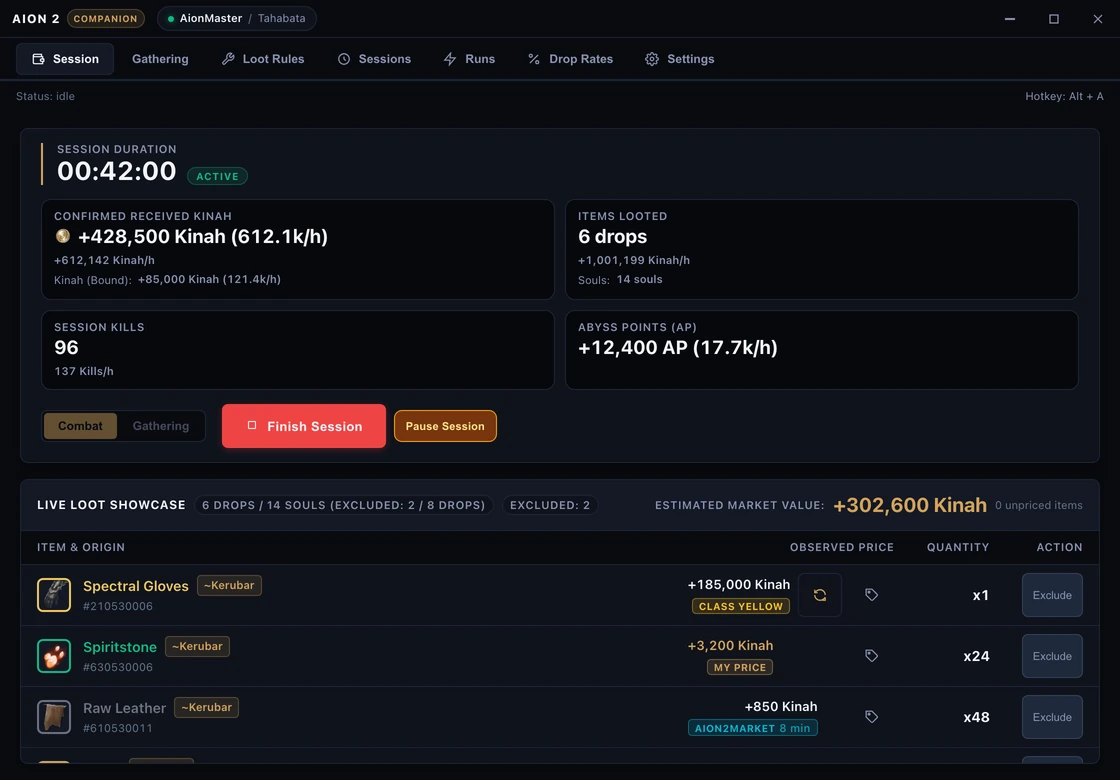
Loot Tracker Features
Real-Time Kinah & AP per Hour
Track your gross and net Kinah per hour factoring in the 10% auction house tax, alongside independent Abyss Points combat metrics.
Empirical Drop Math
Calculates precise drop frequencies per defeated mob, separating solo kills from group drops to eliminate statistical variance.
Dungeon & Instance Audits
Track per-run profitability: clear times, boss encounter drops, legendary loot yields, and total Kinah generated per attempt.
Low-Overhead In-Game Overlay HUD
Compact on-screen HUD with Alt+A repositioning, click-through locking for combat, and immediate display of recent session drops.
What the Loot Tracker Honestly Audits
Clean accounting data captured strictly from local network packets via Npcap, with zero memory inspection or guesswork.
Monitored Combat Events
Verified network events only
- Item drops generated by verified monster defeats (solo and group kills separated)
- Combat Kinah earnings with hourly run rates and 10% market tax deduction
- Abyss Points (AP) earned during combat encounters in real time
- Kill counts mapped directly to the 8,079 catalogued monster database
- Dungeon run durations, boss encounter counts, and net loot yield per run
Intentionally Ignored Events
Strict filters preventing inflated farming stats
- NPC vendor purchases and sales (preventing artificially inflated combat rates)
- Direct player trades and items received through in-game mail
- Manual warehouse transfers or inventory bag reordering
Loot Tracker Questions & Answers
Straightforward answers about drop math, technical requirements, and overlay HUD functionality.
How does the loot tracker calculate Kinah per hour?
It divides confirmed Kinah received from combat kills by the elapsed active session duration, extrapolating a continuous hourly rate and applying the 10% market tax to valued items.
Does the tracker distinguish solo drops from group drops?
Yes. The network parser inspects the combat message and protocol loot attribution, categorizing kills as solo or shared so drop rates reflect true kill conditions.
Does the program work with AION 2 in exclusive fullscreen?
Companion runs as an external process without DirectX injection. To render the floating overlay HUD above the game, AION 2 must be set to 'Borderless Windowed' mode.
Does the loot tracker store my data in the cloud?
By default, all session logs, drop history, and configuration files are stored locally in a SQLite database on your computer. Anonymous telemetry is opt-in, off by default, and excludes character names, server identity, prices, and raw payloads.
Start auditing your farming sessions today
Download the official installer for Windows 10/11 x64 or use the standalone portable archive.